Implementation reference
Free SSCC barcode generator and check digit calculator
On this page
An SSCC identifies one logistics unit, such as a pallet or carton. This browser-only tool calculates or validates the 18-digit value, encodes it as GS1-128 with Application Identifier 00, and downloads a scalable SVG preview without uploading the identifier.
Direct answer: Enter the 17-digit SSCC body to calculate the final GS1 check digit, or enter a complete 18-digit SSCC to validate it. The generated symbol encodes AI
00followed by the SSCC. Before production use, confirm GS1 prefix ownership, prevent identifier reuse, apply the current label dimensions and placement rules, print the label, and verify it with the scanner used in the shipping workflow.
Browser-only tool
Generate a GS1-128 SSCC barcode
No value is uploaded

What the generator puts in the barcode
The SSCC data value is 18 digits: an extension digit, a GS1 company prefix and serial reference whose boundary depends on the assigned prefix length, and a final check digit. In a GS1-128 barcode, Application Identifier 00 tells the scanner that the following fixed-length field is an SSCC.
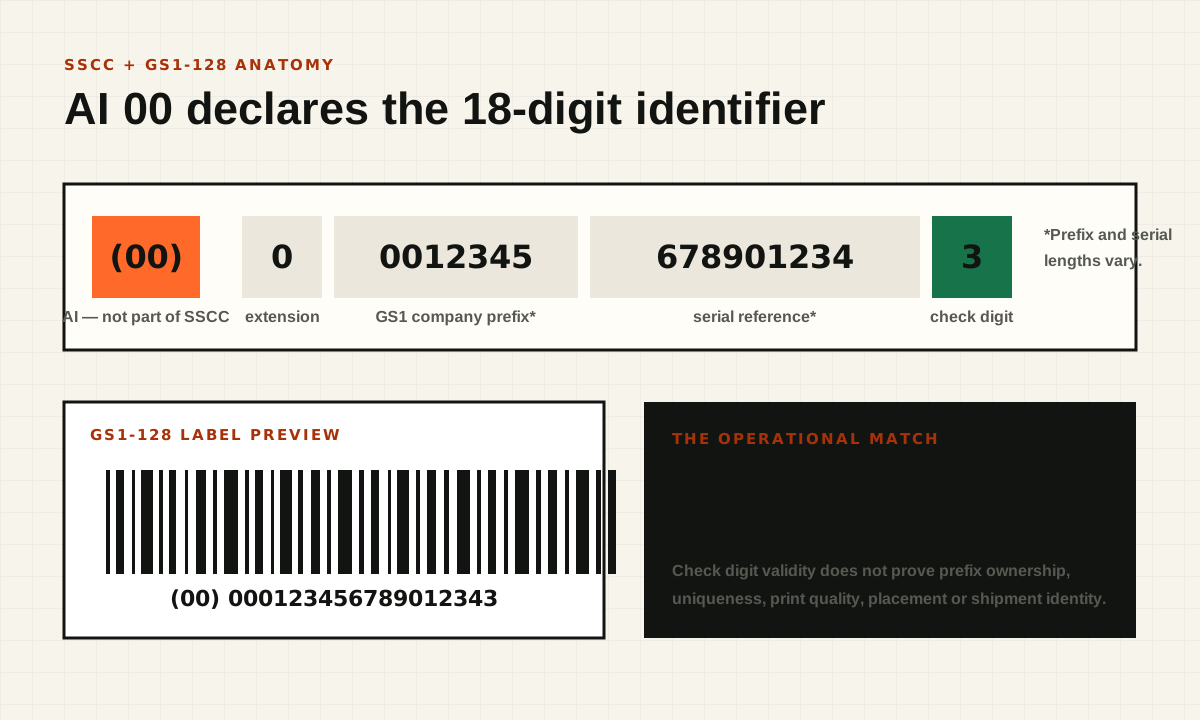
The human-readable parentheses around (00) are presentation, not barcode data. This tool encodes the FNC1 character required for GS1-128, switches to numeric Code Set C, adds the modulo-103 Code 128 symbol checksum, and preserves quiet zones in the SVG preview.
Check digit calculation
For the 17-digit body, multiply alternating positions by three and one from the left, add the results, and choose the digit that brings the total to the next multiple of ten.
check digit = (10 - (weighted sum mod 10)) mod 10
The check digit catches many transcription errors. It does not prove that the GS1 company prefix belongs to the organization, that the serial was allocated uniquely, or that the barcode will scan after printing.
Production label checklist
- Allocate the SSCC from a controlled serial ledger under the correct GS1 company prefix.
- Generate the label and ASN identifier from the same immutable value.
- Apply current GS1 and trading-partner size, quiet-zone, placement, and print-quality requirements.
- Print at the intended printer resolution and physical scale; do not resize the SVG arbitrarily in office software.
- Scan the finished label with representative warehouse equipment.
- Compare the decoded 18 digits with the exact value in the outbound EDI 856
MANsegment or shipment-confirmation payload.

For an Amazon Vendor workflow, use the Amazon SSCC label requirements guide to separate current public Amazon requirements from account-specific EDI placement, then run the complete shipment through the free Amazon EDI preflight.
What this tool does not certify
The preview is not a GS1 licence, prefix-ownership check, serial-allocation service, printer verifier, or trading-partner approval. Barcode conformance depends on the data, symbol dimensions, quiet zones, substrate, contrast, printer quality, placement, and the scanner environment. Current GS1 specifications and the active partner guide remain controlling.
Frequently asked questions
Is AI 00 part of the SSCC?
No. AI 00 declares that the next fixed-length field is an SSCC. The SSCC itself is the following 18 digits, including the check digit.
Can I use the SVG directly on a production label?
Use it as a scalable starting point, then apply the physical dimensions, quiet zones, human-readable layout, printer settings, and placement required by the current GS1 and partner material. Verify the printed result with a scanner before shipping.
Does a valid SSCC guarantee Amazon acceptance?
No. Amazon also requires the physical barcode and electronic shipment identifier to agree, and the surrounding ASN, packing hierarchy, timing, and account-specific workflow can still fail independently.
SSCC, SSCC-18, UCC-128, and GS1-128 explained
These search terms often appear together because older warehouse instructions and newer specifications use different vocabulary. SSCC names the logistics-unit identifier. SSCC-18 emphasizes its eighteen-digit length. GS1-128 names the barcode symbology used by this generator. UCC-128 is terminology still found in older systems and label requests. When implementing a current workflow, resolve the requested data and symbol requirements explicitly instead of assuming every label with one of those names is equivalent.
A shipping label can contain several independent identifiers. A carrier tracking barcode answers a carrier's routing and tracking needs. An SSCC links a logistics unit to shared supply-chain information. A product barcode identifies a trade item. Putting all three on a carton does not make any one of them a substitute for the others. The receiver needs the identifier required by its actual process.
When someone asks for an ASN label, clarify whether they mean a logistics label linked to an advance ship notice, a retailer-specific carton label, or a carrier label. The ASN itself is an electronic business document. The operational connection comes from matching the label's identifier with the appropriate container record in that document. See the EDI 856 example for how container identity fits into a packing hierarchy.
Use the check digit calculator without losing leading zeroes
Treat an SSCC as text throughout the workflow. Spreadsheet software can convert long identifiers to numeric notation, remove leading zeroes, or lose precision. Once those digits are changed, a later format adjustment may not recover the original value. Import identifier columns as text and inspect the saved export before feeding it to a barcode generator or EDI mapper.
Enter seventeen digits when you want the tool to calculate the final digit. Enter eighteen digits when you want to check a complete identifier. Do not include the human-readable (00) prefix in the SSCC field. That prefix describes the barcode data type and is handled separately by the generator. Spaces copied from a label layout should not become part of the stored identifier.
After calculation, compare the output with the source allocation record. A successful mathematical check is a narrow result. It does not establish that the organization controls the prefix or that another warehouse has not already used the same serial. Keep those business checks in the allocation workflow rather than expecting a browser calculator to infer them from eighteen digits.
Worked check digit example
For a transparent arithmetic example, use the illustrative body 00012345678901234. Applying alternating weights of three and one from the left produces a total of 107. The next multiple of ten is 110, so the check digit is 3. The complete illustrative value is 000123456789012343. This calculation demonstrates the method; it does not allocate that identifier to your business.
You can verify the arithmetic independently by grouping the weighted contributions. Zeroes remain in their positions even though they contribute nothing to the sum. Removing a leading zero shifts the weighting of later digits and changes the represented identifier. This is another reason to preserve the full body as text rather than converting it to an integer.
Build automated tests around known fixtures, changed digits, invalid lengths, and non-digit input. Include a body whose check digit is zero so the implementation handles the modulo boundary correctly. For production allocation, test the serial ledger separately from the arithmetic helper. A calculator can be correct while two concurrent workers still assign the same serial number.
Allocate identifiers with a shared serial ledger
A growing shipping operation needs one authoritative allocation process across warehouses, printers, integrations, and manual reprints. The record should identify the allocated value, the logistics unit, creation time, status, and the system or operator that requested it. An idempotent request for the same allocation should return the existing assignment rather than consuming another serial unexpectedly.
Concurrency matters when several packing stations request labels at once. Reserve identifiers atomically and enforce uniqueness in durable storage. Do not derive a serial solely from the current second, a short random suffix, or the last row visible in a spreadsheet. Those methods can collide under ordinary production load or after a restore. Capacity planning should account for the organization's assigned prefix structure and expected allocation volume.
Define what happens when a label is spoiled, a carton is repacked, or a shipment is cancelled. A reprint of the same label is different from allocating a new logistics unit. Preserve the original relationship and the reason for changes. Apply the current GS1 and partner reuse rules through a documented policy; do not recycle numbers simply because a local shipment row was deleted.
Generate the label and ASN from the same value
The safest workflow creates the container identity once, then supplies that exact immutable string to both the label renderer and the EDI mapping. Avoid separate generators in the warehouse and integration system. Two individually valid identifiers still fail the receiving match when the printed carton and electronic notice disagree.

Before release, scan a representative finished label and compare the decoded identifier with the container record in the outbound artifact. This is stronger than comparing two previews produced by the same potentially flawed template. Preserve the scan result or verification event where the business process requires evidence. If the packing tree changes, repeat the affected reconciliation before sending the notice.
For a multi-carton order, verify each carton separately and confirm that its item allocations are correct. A duplicate label can make two physical cartons appear to be one logistics unit. A swapped label can preserve the total carton count while associating the wrong items with each unit. Tests should cover both situations because aggregate shipment totals may still look correct.
Print an SVG at a controlled physical size
An SVG is scalable, but arbitrary scaling can still produce an unsuitable printed symbol. The label template and printer configuration determine the physical result. Record the intended label stock, printer resolution, symbol dimensions, and any scaling applied by the print pipeline. Browser print dialogs and office applications can introduce fit-to-page behavior that differs from the preview.
Test the actual production path: the same printer model, driver settings, stock, ribbon where applicable, and template. Inspect the finished label for clipping, smearing, low contrast, distortion, and nearby graphics encroaching on required clear areas. The exact dimensions and verification requirements should come from the current applicable specification, not measurements guessed from an editorial image.
A scanner reading one label at a desk is useful operational evidence but is not a complete print-quality assessment. Where verification is required, use the appropriate verification process and record the result. Repeat checks after changes to templates, stock, printer settings, or hardware maintenance. A previously successful template can degrade when the physical printing process changes.
Diagnose a barcode that scans incorrectly
First distinguish no-read from wrong-data problems. If the scanner cannot read the symbol, investigate print quality, size, clear areas, orientation, and scanner configuration. If it reads a value but the application rejects it, inspect the decoded data and its interpretation. The failure may be an unexpected prefix, missing leading zero, incorrect field length, or mismatch with the ASN.
Capture the scanner output in a safe diagnostic view that reveals control or prefix behavior without altering the stored SSCC. Some scanner configurations include symbology identifiers or separators in their transmitted output. The receiving application should parse the agreed scanner contract deliberately. Blindly stripping every non-digit character can hide a configuration problem or merge unrelated fields.
Compare four representations: the allocation ledger value, human-readable label text, decoded barcode data, and transmitted container value. The first point of disagreement locates the likely defect. If the ledger and ASN agree but the barcode differs, inspect rendering. If the label and scan agree but the ASN differs, inspect mapping or stale packing data. This method avoids repeatedly regenerating labels without addressing the cause.
Distinguish a carton identifier from a product identifier
A carton can contain one product, several products, or a variable quantity. Its logistics-unit identifier describes that particular physical unit, not a permanent product type. Reusing the product's identifier as the carton identity loses the ability to distinguish two cartons of the same goods. Conversely, an SSCC should not be used as the item master identifier when ordering or invoicing products.

Keep the item-to-container relationship in the shipment model. A carton record identifies the logistics unit; allocation records state which items and quantities it contains. A pallet can group cartons according to the chosen workflow. This separation supports mixed cartons and repacking without changing the meaning of the product identifiers.
For an EDI integration, preserve qualifiers as well as values. A string of digits alone does not explain whether it is a product code, customer item number, or logistics identifier. The mapping should select the proper target field from an explicit source meaning. Unknown identifier types should create a review task instead of being inferred solely from length.
Choose between a free generator and a warehouse integration
A browser generator is useful for understanding the format, checking a number, creating a controlled preview, or diagnosing an isolated label. A recurring warehouse workflow needs additional functions: allocation, permissions, batch generation, printer templates, reprint history, packing-system integration, and reconciliation with the released ASN. Evaluate those needs separately from whether a tool can draw a barcode.

Ask a prospective solution to demonstrate two packing stations allocating identifiers concurrently, a printer failure followed by a reprint, a repacked carton, and a duplicate outbound file. The desired outcome is a consistent physical and electronic identity with traceable recovery. A large batch-download button does not prove those operational invariants.
ShipmentSentry's generator on this page runs in the browser for the identifier operation described above. Its preview is one component of an EDI workflow. The integration guide explains how a full platform connects packing evidence, mapping, validation, delivery, and acknowledgments. Check the product's current supported capabilities for the specific automated workflow you need.
More SSCC and shipping-label questions
Can I generate SSCC labels in Excel?

Excel can hold allocation data and feed a controlled label process, but identifier columns must remain text and allocation must prevent duplicates across users. A barcode font or formula alone does not establish a complete GS1-128 encoding and printing workflow. Validate the generated data and verify the physical result through the actual printer path.
Is a Code 128 barcode automatically a GS1-128 barcode?
No. The GS1 use of the symbology has additional data-encoding conventions, including the required identification of GS1 data and application identifiers. Select a generator that explicitly supports GS1-128 for the intended data. Do not assume that drawing an ordinary Code 128 symbol around the visible parentheses produces the correct result.
Can I create an SSCC without an allocated company prefix?
This calculator can demonstrate arithmetic, but production allocation requires the appropriate GS1 identification arrangements and authority to use the prefix. The tool cannot grant those rights or verify them from a number. Confirm the organization's allocation arrangements before using generated identifiers on trading-partner shipments.
Why does the scanner show more than eighteen digits?
The decoded stream may include the application identifier and scanner-specific framing in addition to the SSCC. Inspect the scanner configuration and expected application input contract. The SSCC itself remains eighteen digits. Separate framing and data intentionally rather than truncating the string until it happens to fit.
Can an AI image generator make a usable SSCC label?
Use generated images for illustrations, not operational barcodes. A visually plausible pattern can encode nothing useful or the wrong value. Generate the production symbol deterministically from the allocated identifier, then verify the printed output and its match to the ASN. The illustrations in this guide are educational scenes, not printable logistics labels.
What should a batch SSCC validator report?
Alongside invalid lengths and check digits, a batch workflow should identify repeated values within the uploaded set and compare allocations with the relevant shipment records. Keep each finding tied to its source row and container. A batch of individually valid numbers can still contain the same identifier twice or assign a carton to the wrong order. Report the number of records checked, the exact supported checks, and unresolved allocation questions. The single-value SSCC generator on this page does not replace that warehouse-level reconciliation.
Primary sources
Apply the current standard, profile, and trading-partner requirements for your workflow. Each result establishes only the checks it explicitly reports.